

Typed.js Elementor Widget
A WordPress plugin that brings Typed.js to Elementor, with controls for animated text, typing speed, cursor, and responsive typography. Available on WordPress.org and GitHub.
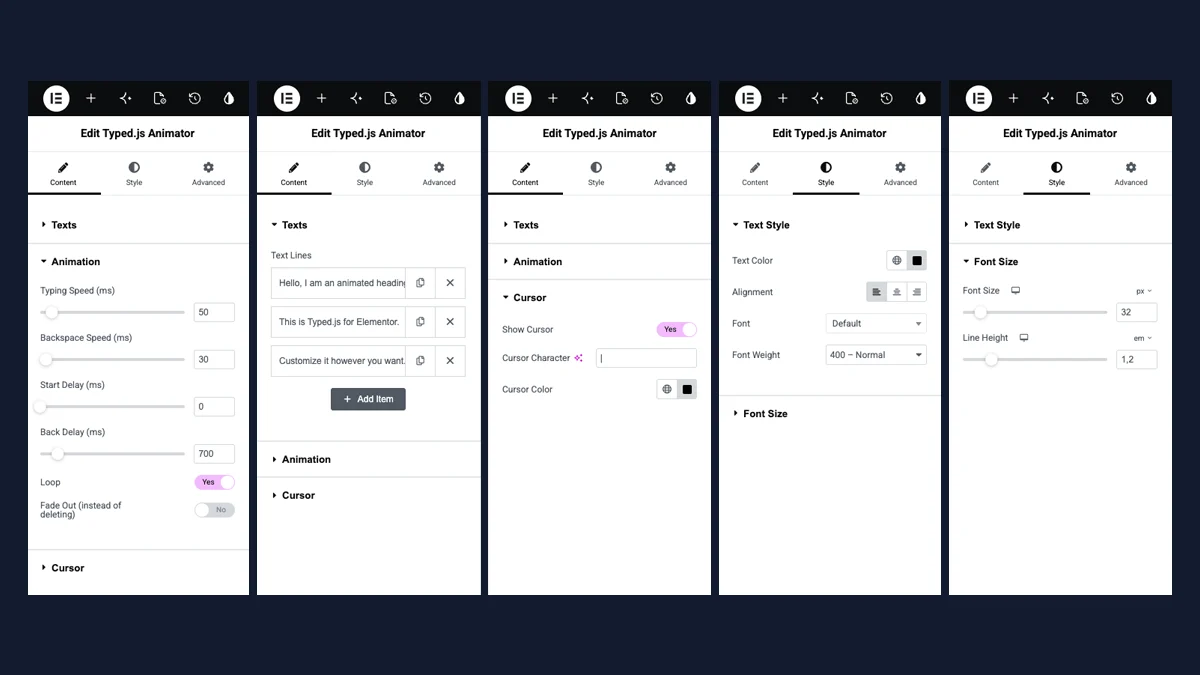
Typed.js Elementor Widget is a WordPress plugin that brings the Typed.js typewriter effect into the Elementor editor. It lets you cycle through multiple lines of text and customize the animation, cursor, and typography using the widget’s controls.
Turning a recurring setup into a reusable widget
The project grew out of using Typed.js in Elementor layouts. Repeating the same integration on each new website meant editing code even for a simple effect. I turned that setup into a native widget so I could reuse and adjust it directly in the editor.
Page builders can add and reorder text lines, adjust typing and backspacing speeds, set delays, and enable looping. Cursor appearance, colors, and typography are also configured in the Elementor panel, with font size and line height settings for desktop, tablet, and mobile.
Available in the WordPress.org plugin directory
The plugin works with Elementor Free and Pro and bundles Matt Boldt’s Typed.js library locally. My work covers the WordPress and Elementor integration, the widget controls, and initialization in the editor and on published pages.
I published the plugin in the official WordPress.org directory and made the source code available on GitHub. Version 1.0.3 was tested with WordPress 7.1.3 and Elementor 4.3.5, checking widget registration, frontend animation, and editing and saving text in the editor.
Get the plugin on WordPress.org · Explore the source on GitHub
Have something similar in mind?
Tell me about it. In a free 20-minute check, we work out what you need and where to start.